> ## Documentation Index
> Fetch the complete documentation index at: https://docs.phylax.systems/llms.txt
> Use this file to discover all available pages before exploring further.
# Incidents
> View incidents prevented by the Credible Layer
Incidents group invalidating transactions: transactions that violated assertions protecting contracts. In production, the [Enforcer](/credible/glossary#assertion-enforcer) drops those transactions before settlement. In staging, the platform records that the transaction would have been dropped, but the transaction still lands on the live network because staging is observe-only.
For the end-to-end flow, see the incident lifecycle diagram in
[Architecture Overview](/credible/architecture-overview#incident-lifecycle-public-view).
## How Incidents Are Grouped
An incident represents the invalidation of an assertion over a one-hour time period. Multiple invalidating transactions can belong to the same incident if they violate the same assertion within that window.
**Why group transactions into incidents?**
* An attacker may craft multiple transactions that all violate the same assertion—these represent the same logical attack
* One hour is a reasonable estimate for how long an attack attempt might last
* After one hour without violations, a new invalidation likely indicates a different attack and creates a new incident
This grouping ensures you receive meaningful alerts without being spammed by repeated notifications for the same security event.
This is our initial approach to incident grouping and may be refined based on user feedback.
## Project Incidents (Manager View)
Project incidents are visible only to the project manager and live inside the project dashboard.
Non-owners see project events, not incidents.
### Access and Navigation
* Open a project and select the **Incidents** tab.
* Route: `/projects/{project_id}/incidents`
 ### Incidents
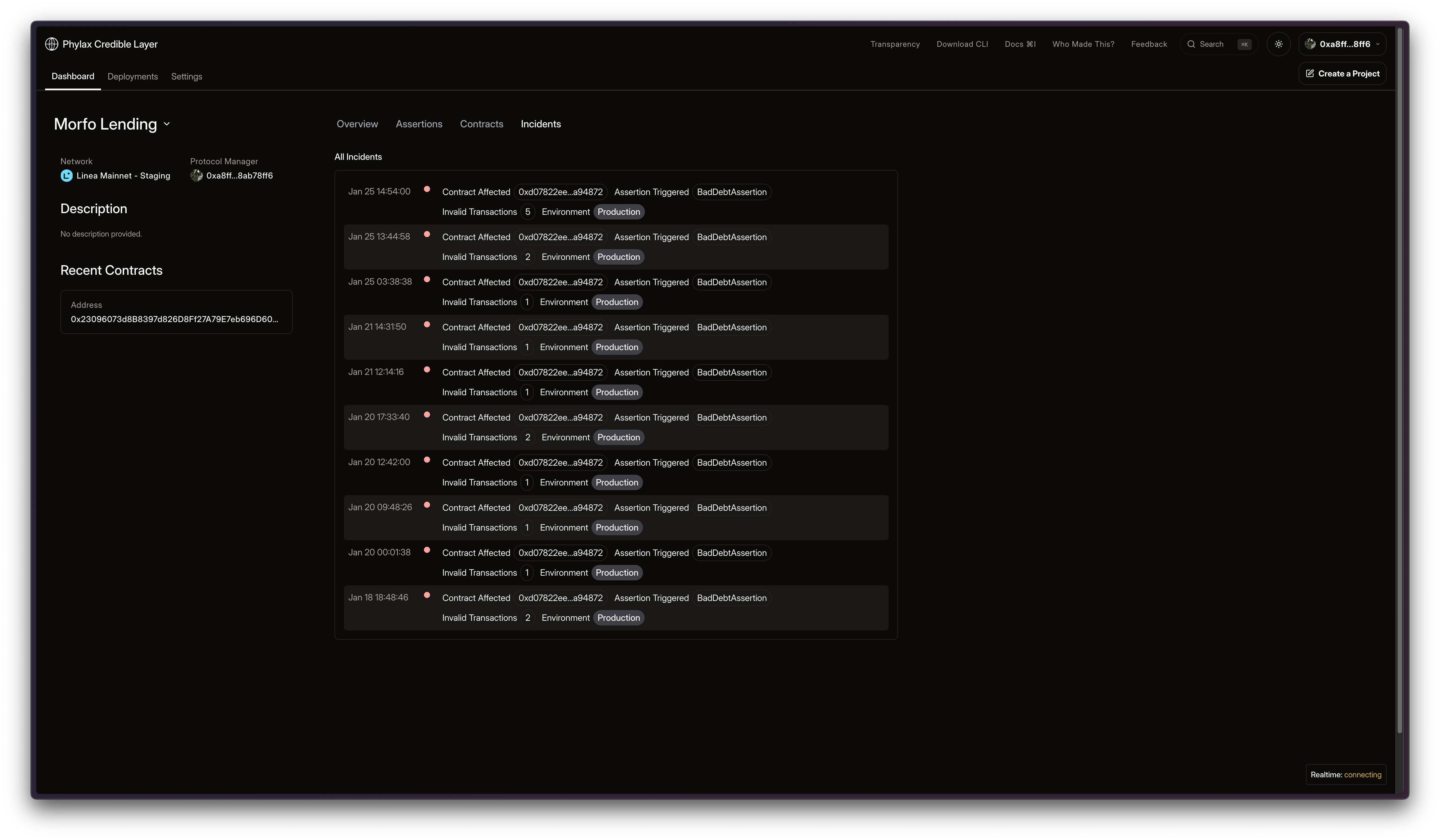
The incidents list shows recent incidents for the project, ordered by most recent.
Each row includes:
* **Timestamp**
* **Contract Affected**
* **Assertion Triggered**
* **Invalid Transactions** count
* **Environment** (staging or production)
Click a row to open the incident detail view.
### Incidents
The incidents list shows recent incidents for the project, ordered by most recent.
Each row includes:
* **Timestamp**
* **Contract Affected**
* **Assertion Triggered**
* **Invalid Transactions** count
* **Environment** (staging or production)
Click a row to open the incident detail view.
 ### Incident Detail and Invalidating Transactions
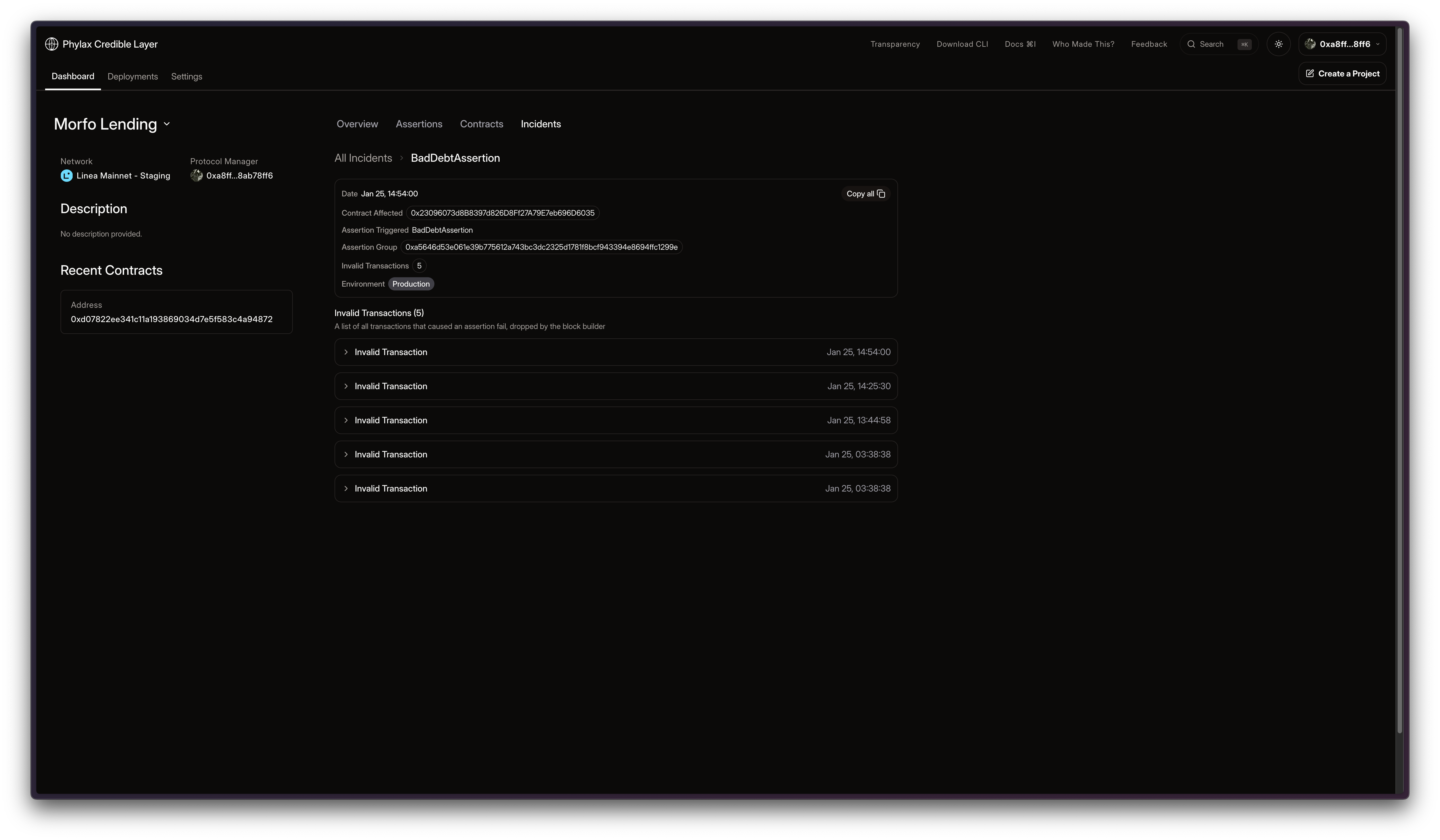
The incident detail page summarizes the incident and lists invalidating transactions.
It includes:
* **Incident detail card** with date, contract affected, assertion triggered, assertion group, invalid transaction count, and environment
* **Critical warning banner** if any invalidating transaction landed on-chain
* **Invalid Transactions** list with expandable rows and action buttons
Each invalidating transaction includes:
* Transaction hash, to/from, value, calldata, and block number (if available)
* **Open Debug View** to inspect the trace
* **Copy Data as JSON** to export the transaction
### Incident Detail and Invalidating Transactions
The incident detail page summarizes the incident and lists invalidating transactions.
It includes:
* **Incident detail card** with date, contract affected, assertion triggered, assertion group, invalid transaction count, and environment
* **Critical warning banner** if any invalidating transaction landed on-chain
* **Invalid Transactions** list with expandable rows and action buttons
Each invalidating transaction includes:
* Transaction hash, to/from, value, calldata, and block number (if available)
* **Open Debug View** to inspect the trace
* **Copy Data as JSON** to export the transaction
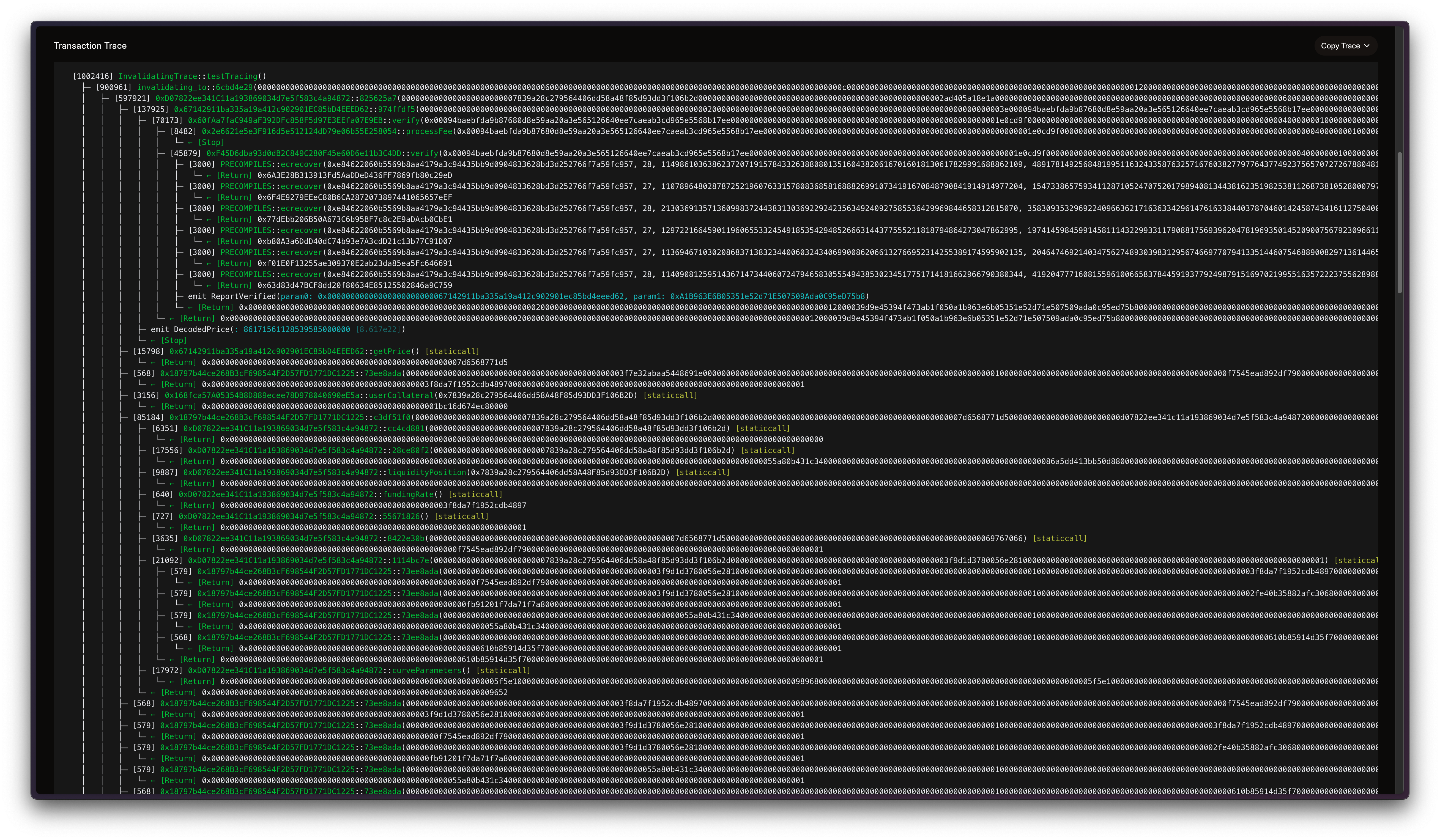
 ### Debug Trace View
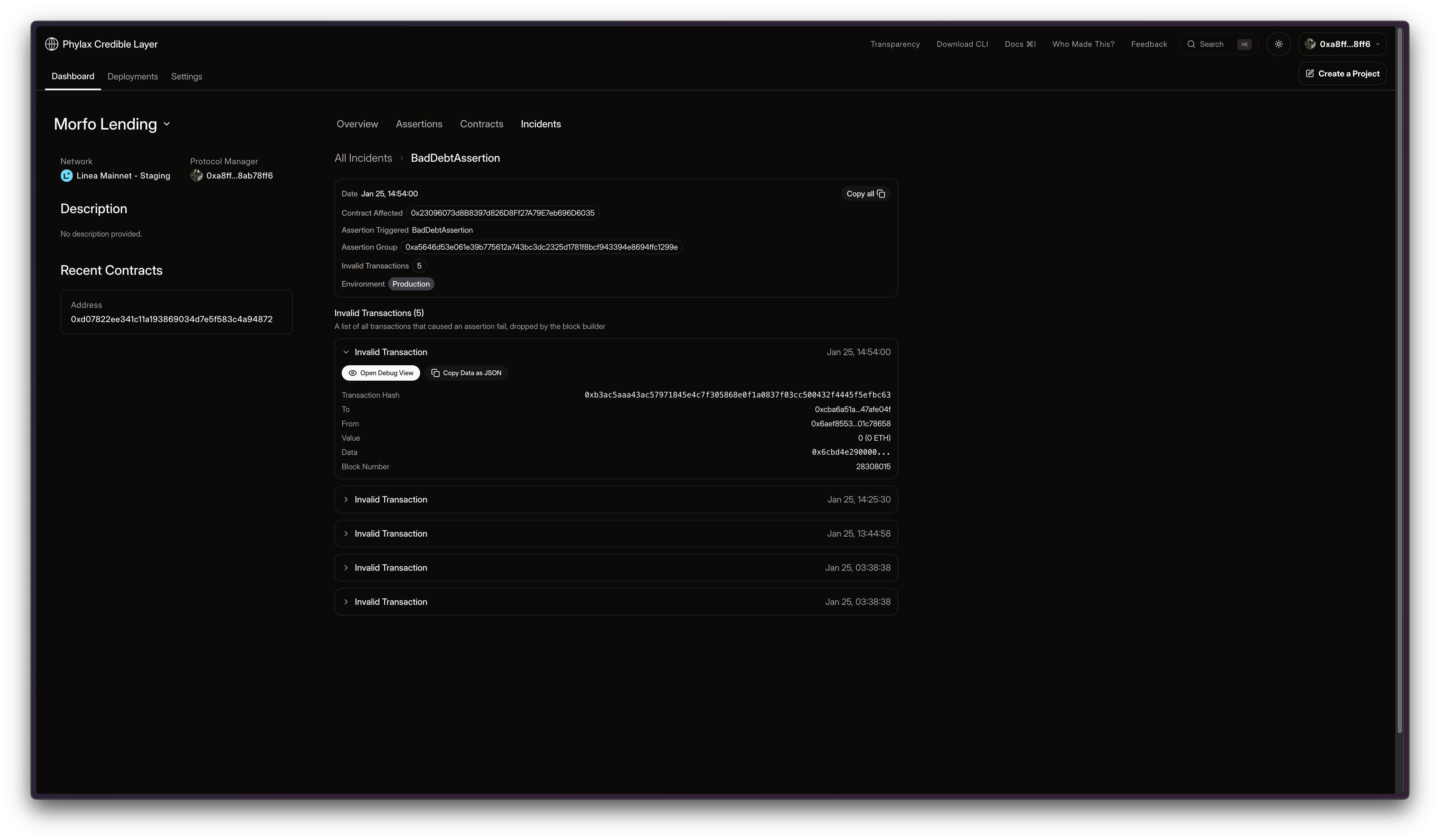
The debug trace view opens from an invalidating transaction.
* Route: `/projects/{project_id}/trace/{incident_id}/{transaction_id}`
* **Transaction Attributes** panel with copy-all action
* **Execution Context** panel (block environment + previous transactions)
* **Transaction Trace** panel with status: pending, in progress, completed, failed, or skipped
### Debug Trace View
The debug trace view opens from an invalidating transaction.
* Route: `/projects/{project_id}/trace/{incident_id}/{transaction_id}`
* **Transaction Attributes** panel with copy-all action
* **Execution Context** panel (block environment + previous transactions)
* **Transaction Trace** panel with status: pending, in progress, completed, failed, or skipped
 ### Real-Time Updates and Alerts
When a project manager is viewing the incidents list, new incidents stream into the list in real time.
You can also set up external alerts via webhooks:
* **Slack Integration**: Configure Slack webhooks to receive incident notifications
* **PagerDuty Integration**: Configure PagerDuty webhooks to receive incident notifications
See [Integrations](/credible/dapp-integrations) for setup instructions.
## Public Transparency Incidents
The public explorer includes a limited invalidations view for transparency. Detailed transaction payloads, traces, and project-specific incident evidence are only available to project managers and collaborators with access.
Detailed invalidation evidence is scoped to the project team so they can triage with full payloads and traces while public views remain concise.
### Staging vs. Production
| Environment | What an invalidation means | User impact |
| ----------- | ----------------------------------------------------------------------------- | --------------------------------------------------------- |
| Staging | The transaction would have violated an assertion under production enforcement | The transaction is recorded for review but is not dropped |
| Production | The transaction violated an enforced assertion | The transaction is dropped before settlement |
## Use Cases
* Monitor when assertions prevent violations for your projects
* Review attempted invalid transactions targeting your protocol
* Tune assertions based on staging invalidations before production promotion
* Add or refine assertions based on incident data
Incident viewing is read-only. You cannot modify or delete incident records.
## Next Steps
Learn more about the platform
Browse projects and assertions
Learn how to write effective assertions
Understand how assertion validation works
### Real-Time Updates and Alerts
When a project manager is viewing the incidents list, new incidents stream into the list in real time.
You can also set up external alerts via webhooks:
* **Slack Integration**: Configure Slack webhooks to receive incident notifications
* **PagerDuty Integration**: Configure PagerDuty webhooks to receive incident notifications
See [Integrations](/credible/dapp-integrations) for setup instructions.
## Public Transparency Incidents
The public explorer includes a limited invalidations view for transparency. Detailed transaction payloads, traces, and project-specific incident evidence are only available to project managers and collaborators with access.
Detailed invalidation evidence is scoped to the project team so they can triage with full payloads and traces while public views remain concise.
### Staging vs. Production
| Environment | What an invalidation means | User impact |
| ----------- | ----------------------------------------------------------------------------- | --------------------------------------------------------- |
| Staging | The transaction would have violated an assertion under production enforcement | The transaction is recorded for review but is not dropped |
| Production | The transaction violated an enforced assertion | The transaction is dropped before settlement |
## Use Cases
* Monitor when assertions prevent violations for your projects
* Review attempted invalid transactions targeting your protocol
* Tune assertions based on staging invalidations before production promotion
* Add or refine assertions based on incident data
Incident viewing is read-only. You cannot modify or delete incident records.
## Next Steps
Learn more about the platform
Browse projects and assertions
Learn how to write effective assertions
Understand how assertion validation works