> ## Documentation Index
> Fetch the complete documentation index at: https://docs.phylax.systems/llms.txt
> Use this file to discover all available pages before exploring further.
# Invalidations
> Review invalidation events, invalidating transactions, assertion results, and replay evidence
An invalidation is recorded when a transaction violates an assertion protecting a contract. In production, the [Enforcer](/credible/glossary#assertion-enforcer) applies the network's documented enforcement policy. On enforced transaction paths, the transaction is rejected before settlement. In staging, the platform records that the transaction would have been rejected, but the transaction can still land on the live network because staging is observe-only.
For the end-to-end flow, see the invalidation lifecycle diagram in
[Architecture Overview](/credible/architecture-overview#invalidation-lifecycle-public-view).
## How invalidations are organized
An invalidation event identifies the assertion and contract involved in a violation. An event can contain one or more invalidating transactions, allowing related attempts to be reviewed together while preserving transaction-level evidence.
The platform separates invalidations by environment:
* **Production**: violations detected on enforced assertion paths
* **Staging**: observe-only violations recorded while an assertion is being evaluated before production promotion
## Project Invalidations (Manager View)
Detailed project invalidations are visible only to the project manager and approved collaborators inside the project dashboard.
Full invalidation evidence is private by default. Project teams can opt in to share invalidation data with Phylax support or participating network security teams when they need help debugging or coordinating a response.
### Invalidation list
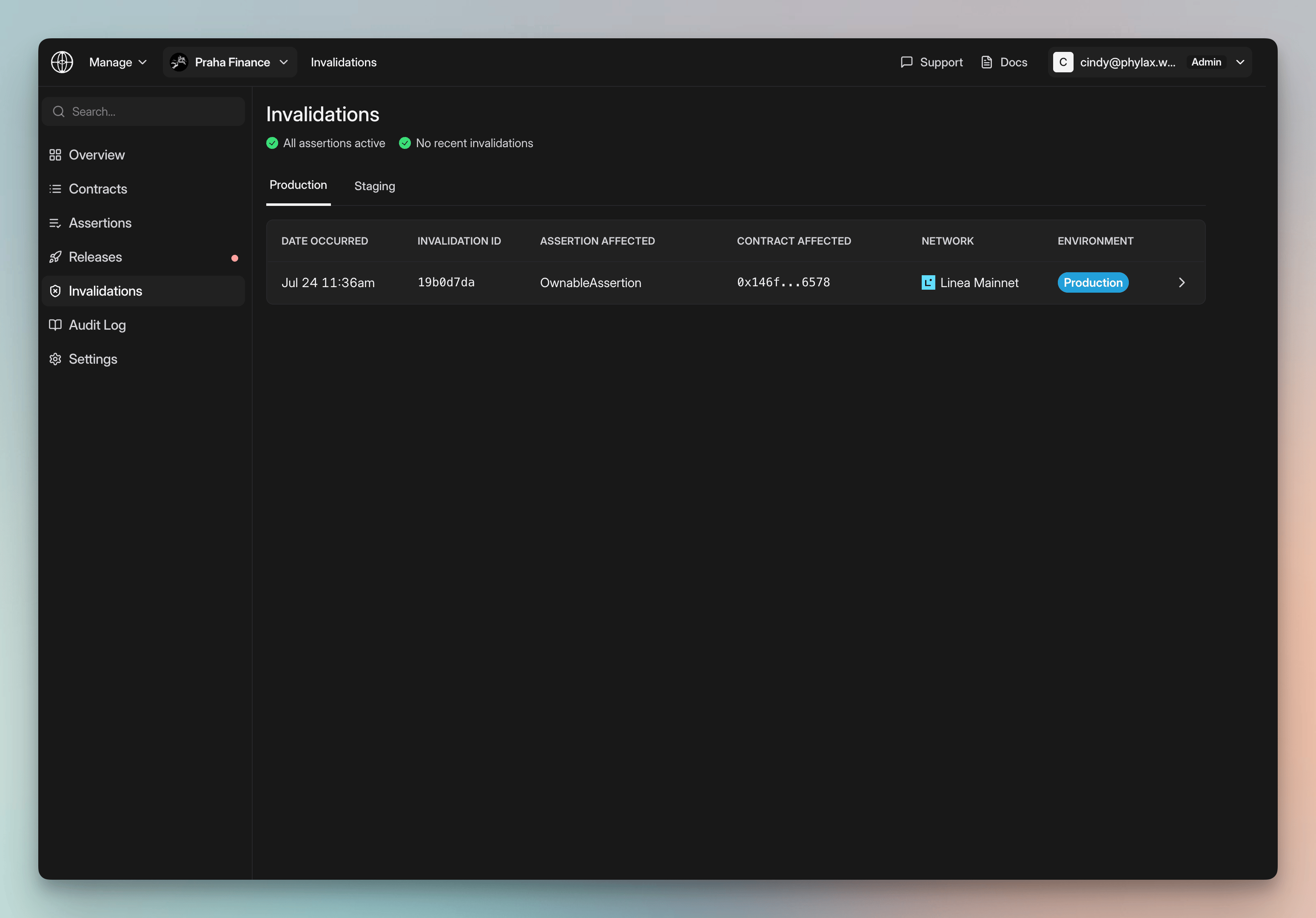
Open a project and select **Invalidations**. The page shows the current assertion status, recent invalidation activity, and separate **Production** and **Staging** tabs.
Each invalidation row includes:
* **Date occurred**
* **Invalidation ID**
* **Assertion affected**
* **Contract affected**
* **Network**
* **Environment**
Select a row to open the invalidation event.
### Invalidation event
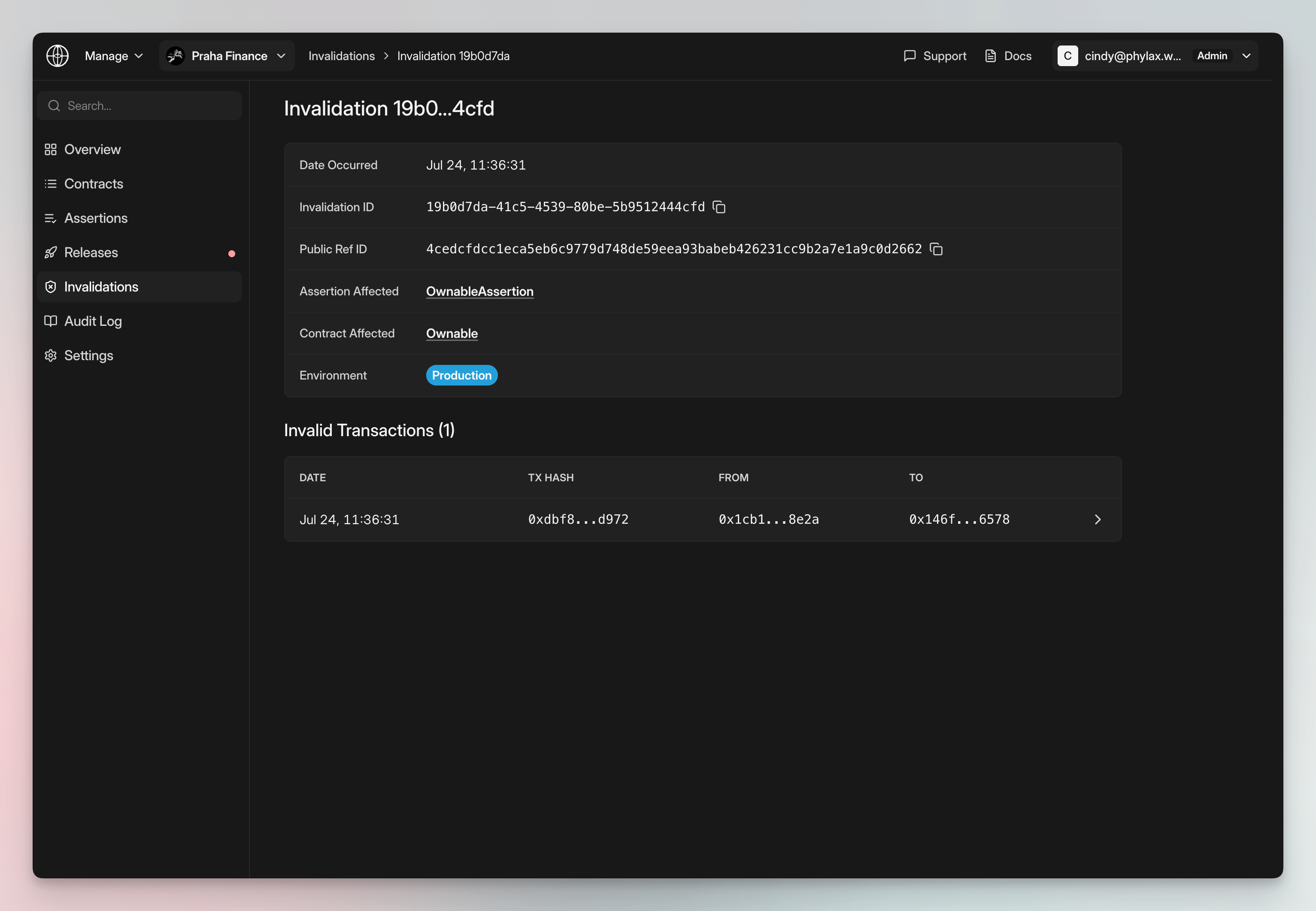
The invalidation event page summarizes the event and lists its invalidating transactions.
Event details include:
* **Date occurred**
* **Invalidation ID**
* **Public Ref ID**, when available
* **Assertion affected**
* **Contract affected**
* **Environment**
The **Invalid Transactions** table lists the date, transaction hash, sender, and recipient for each transaction in the event. Select a transaction to open its replay.
### Invalidating transaction replay
The transaction replay explains what the transaction attempted, how the protocol call executed, and why the assertion rejected it.
The replay includes:
* **Replay overview**: transaction status, hash, sender, recipient, transaction type, nonce, gas, and network
* **Assertion result**: assertion name, selector, adopter, and revert reason
* **What changed**: confirmed token, vault, Safe, and administrative events shown in execution order
* **Execution evidence**: separate views of transaction execution and assertion evaluation
* **Developer data**: raw transaction and assertion traces, including hidden internal calls when expanded
* **Execution context**: block state, prior transactions, and block environment used for the replay
The replay shows two separate results:
1. **Transaction execution:** Did the protocol call run successfully?
2. **Assertion evaluation:** Did the resulting state satisfy the assertion?
A call can pass the first check and fail the second. In that case, the assertion rejects the transaction.
### Real-time updates and alerts
Project teams can configure external notifications:
* **Slack**: receive invalidation notifications through a Slack integration
* **PagerDuty**: send invalidation notifications to an incident-response workflow
Invalidation alerts can represent an active exploit attempt, a false positive affecting legitimate protocol activity, or an assertion that needs tuning. See [Integrations](/credible/dapp-integrations) for setup instructions.
## Invalidations in The Phylax Explorer
The Phylax Explorer can show redacted aggregate invalidation history, such as a reference ID and timestamp, when that data is public. Full transaction payloads, replay evidence, traces, staging records, notification settings, and project-specific evidence remain available only to project managers and approved collaborators.
## Staging vs. production
| Environment | What an invalidation means | User impact |
| ----------- | ----------------------------------------------------------------------------- | -------------------------------------------------------------------------------------------------------------------------- |
| Staging | The transaction would have violated an assertion under production enforcement | The transaction is recorded for review but is not rejected |
| Production | The transaction violated an enforced assertion | The transaction is rejected before settlement on enforced paths, or handled according to the documented integration policy |
## Use cases
* Monitor assertion violations across production and staging
* Review the state change and assertion result for an invalidating transaction
* Inspect transaction execution, assertion evaluation, traces, and replay context
* Tune assertions using staging evidence before production promotion
Invalidation viewing is read-only. You cannot modify or delete invalidation records.
## Next steps
Learn more about the platform
Browse projects and assertions
Learn how to write effective assertions
Understand how assertion validation works
 ### Invalidation event
The invalidation event page summarizes the event and lists its invalidating transactions.
Event details include:
* **Date occurred**
* **Invalidation ID**
* **Public Ref ID**, when available
* **Assertion affected**
* **Contract affected**
* **Environment**
The **Invalid Transactions** table lists the date, transaction hash, sender, and recipient for each transaction in the event. Select a transaction to open its replay.
### Invalidation event
The invalidation event page summarizes the event and lists its invalidating transactions.
Event details include:
* **Date occurred**
* **Invalidation ID**
* **Public Ref ID**, when available
* **Assertion affected**
* **Contract affected**
* **Environment**
The **Invalid Transactions** table lists the date, transaction hash, sender, and recipient for each transaction in the event. Select a transaction to open its replay.
 ### Invalidating transaction replay
The transaction replay explains what the transaction attempted, how the protocol call executed, and why the assertion rejected it.
The replay includes:
* **Replay overview**: transaction status, hash, sender, recipient, transaction type, nonce, gas, and network
* **Assertion result**: assertion name, selector, adopter, and revert reason
* **What changed**: confirmed token, vault, Safe, and administrative events shown in execution order
* **Execution evidence**: separate views of transaction execution and assertion evaluation
* **Developer data**: raw transaction and assertion traces, including hidden internal calls when expanded
* **Execution context**: block state, prior transactions, and block environment used for the replay
The replay shows two separate results:
1. **Transaction execution:** Did the protocol call run successfully?
2. **Assertion evaluation:** Did the resulting state satisfy the assertion?
A call can pass the first check and fail the second. In that case, the assertion rejects the transaction.
### Real-time updates and alerts
Project teams can configure external notifications:
* **Slack**: receive invalidation notifications through a Slack integration
* **PagerDuty**: send invalidation notifications to an incident-response workflow
Invalidation alerts can represent an active exploit attempt, a false positive affecting legitimate protocol activity, or an assertion that needs tuning. See [Integrations](/credible/dapp-integrations) for setup instructions.
## Invalidations in The Phylax Explorer
The Phylax Explorer can show redacted aggregate invalidation history, such as a reference ID and timestamp, when that data is public. Full transaction payloads, replay evidence, traces, staging records, notification settings, and project-specific evidence remain available only to project managers and approved collaborators.
## Staging vs. production
| Environment | What an invalidation means | User impact |
| ----------- | ----------------------------------------------------------------------------- | -------------------------------------------------------------------------------------------------------------------------- |
| Staging | The transaction would have violated an assertion under production enforcement | The transaction is recorded for review but is not rejected |
| Production | The transaction violated an enforced assertion | The transaction is rejected before settlement on enforced paths, or handled according to the documented integration policy |
## Use cases
* Monitor assertion violations across production and staging
* Review the state change and assertion result for an invalidating transaction
* Inspect transaction execution, assertion evaluation, traces, and replay context
* Tune assertions using staging evidence before production promotion
### Invalidating transaction replay
The transaction replay explains what the transaction attempted, how the protocol call executed, and why the assertion rejected it.
The replay includes:
* **Replay overview**: transaction status, hash, sender, recipient, transaction type, nonce, gas, and network
* **Assertion result**: assertion name, selector, adopter, and revert reason
* **What changed**: confirmed token, vault, Safe, and administrative events shown in execution order
* **Execution evidence**: separate views of transaction execution and assertion evaluation
* **Developer data**: raw transaction and assertion traces, including hidden internal calls when expanded
* **Execution context**: block state, prior transactions, and block environment used for the replay
The replay shows two separate results:
1. **Transaction execution:** Did the protocol call run successfully?
2. **Assertion evaluation:** Did the resulting state satisfy the assertion?
A call can pass the first check and fail the second. In that case, the assertion rejects the transaction.
### Real-time updates and alerts
Project teams can configure external notifications:
* **Slack**: receive invalidation notifications through a Slack integration
* **PagerDuty**: send invalidation notifications to an incident-response workflow
Invalidation alerts can represent an active exploit attempt, a false positive affecting legitimate protocol activity, or an assertion that needs tuning. See [Integrations](/credible/dapp-integrations) for setup instructions.
## Invalidations in The Phylax Explorer
The Phylax Explorer can show redacted aggregate invalidation history, such as a reference ID and timestamp, when that data is public. Full transaction payloads, replay evidence, traces, staging records, notification settings, and project-specific evidence remain available only to project managers and approved collaborators.
## Staging vs. production
| Environment | What an invalidation means | User impact |
| ----------- | ----------------------------------------------------------------------------- | -------------------------------------------------------------------------------------------------------------------------- |
| Staging | The transaction would have violated an assertion under production enforcement | The transaction is recorded for review but is not rejected |
| Production | The transaction violated an enforced assertion | The transaction is rejected before settlement on enforced paths, or handled according to the documented integration policy |
## Use cases
* Monitor assertion violations across production and staging
* Review the state change and assertion result for an invalidating transaction
* Inspect transaction execution, assertion evaluation, traces, and replay context
* Tune assertions using staging evidence before production promotion